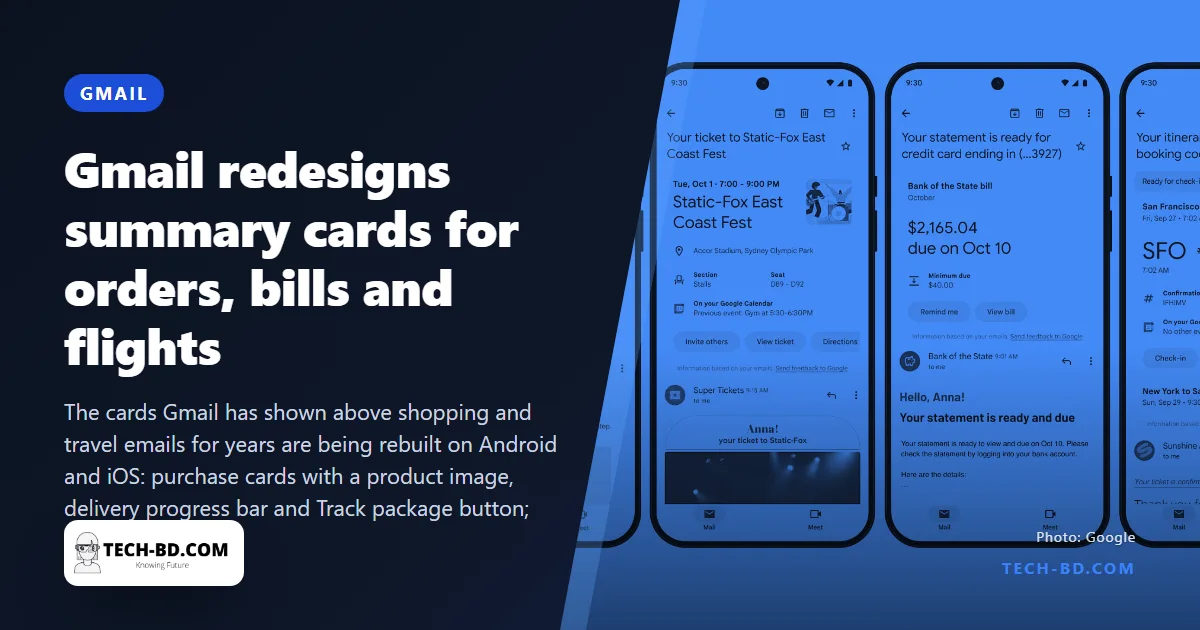
For years Gmail has drawn a small box above certain emails — an order confirmation, a flight booking — pulling out the useful facts so you need not read the message. Google is now rebuilding those summary cards on the Android and iOS apps, and the redesign turns them from a summary into a control panel.
Four kinds of card
Purchases come first. The card shows a picture of what you bought, a progress bar for the delivery, a Track package button that opens the courier’s live status, and View order to jump to the seller’s site. Later this month come events — name, date, venue, a link to add it to Google Calendar, seat numbers, tickets, directions and an invite button; bills, including credit-card statements, showing the amount due, the minimum payment and the available credit, with a button to set a reminder in Google Tasks; and travel, with a graphic of the flight times, airport, confirmation number and a check-in button, and check-in and check-out times for hotel bookings. The most important fact on each card is set in large type; the card updates itself as new emails arrive, so a shipped-then-delayed order shows the latest state rather than the first.
“Happening soon”
A new section at the top of the inbox gathers the next few days’ cards — the flight on Thursday, the concert on Saturday, the bill due Monday — so they can be found without searching. Gmail already knows these dates from the emails; it is simply showing them where you look first.
How it works, and what it reads
The cards are built from structured data that senders include in their emails (the schema.org markup Google has asked retailers and airlines to add since 2013) and, where that is missing, from Gmail’s own parsing of the message. That parsing is the part worth being clear about: it runs on Google’s servers, on the content of your mail, as Gmail’s tabs and spam filter always have. It is not the Gemini-in-Gmail AI feature, which is a separate, paid, opt-in product; summary cards are on for everyone and can be turned off under Settings → Smart features.
In Bangladesh
Whether a card appears depends on the sender. Daraz, Pickaboo, Biman and US-Bangla, and the banks’ credit-card statements will produce cards only if their emails carry the markup or match Google’s templates — Daraz’s do; most local sellers’ do not, and a courier like Pathao or RedX that confirms by SMS produces nothing. The feature is useful in proportion to how much of your commerce arrives by email, which for most people here is the international part: Amazon, AliExpress, airlines, hotels.
Why the cards will not appear on your Daraz mail
Gmail is not reading these emails the way a person would. The cards are built from structured markup that the sender embeds in the message — a block of schema.org data, invisible when you read the mail, that states in machine-readable form: this is an order, here is the tracking number, here is the delivery window.
Amazon, most airlines and the large international hotel chains emit it, because Google published the specification and it costs them a day of engineering to support. Almost no Bangladeshi sender does: not Daraz, not bKash, not the local airlines, not the utility billers. Without that block there is nothing for Gmail to lift, so the email stays an email.
Which means the practical answer for a developer here is pleasantly small. Adding schema.org Order or FlightReservation markup to your transactional templates is an afternoon’s work, and it is the difference between your order confirmation sitting in a list and your brand appearing as a tracking bar at the top of the customer’s inbox.
Sources: Times of India, 9to5Google, via Prothom Alo.